Simple CSV holds a feed action when changed source columns make its saved mapping unsafe. A mapping tells the app which source column supplies each Shopify field. A held run stops before changing any products in Shopify.
The hold check and its email are available on every plan, including for Run now. Scheduling still requires Pro or Scale. Files set to First row is not a header are not checked for these holds. In those files, a column shift can map the wrong data without a hold warning.
Why a column change can hold an action
For CSV and Excel files with a header row, mappings saved by column name follow those names. Adding columns, reordering columns or removing an unmapped column does not hold the action. Removing or renaming a mapped column does. Header matching is case-sensitive and ignores spaces at the start or end.
Older mappings may still use column positions. With headers enabled, inserting or removing a column before a mapped position holds the action. Changes after the last mapped column do not. Blank headers and headers containing | or * also use positions. Use unique, non-blank headers when you control the file. Read how saved mappings work.
For XML feeds, field positions stay stable between downloads and new fields are added at the end. An optional field appearing in a different record does not move the other fields. A mapped field disappearing from the whole file holds the action.
The check needs an earlier list of columns to compare with the current file. If the first run has no saved comparison, it runs and records the current columns. It cannot detect a change that happened before that. Saving a mapping review also records a comparison for later runs.
Recognize the warning and email
Open Simple CSV from Shopify Admin and open the affected feed. Its warning lists the old and new column names and positions. For a missing column, the new name is Missing and its position is shown as a dash.
The warning says:
Mapped source columns changed. This run stopped before changing products. Review and save the mapping to release the hold.
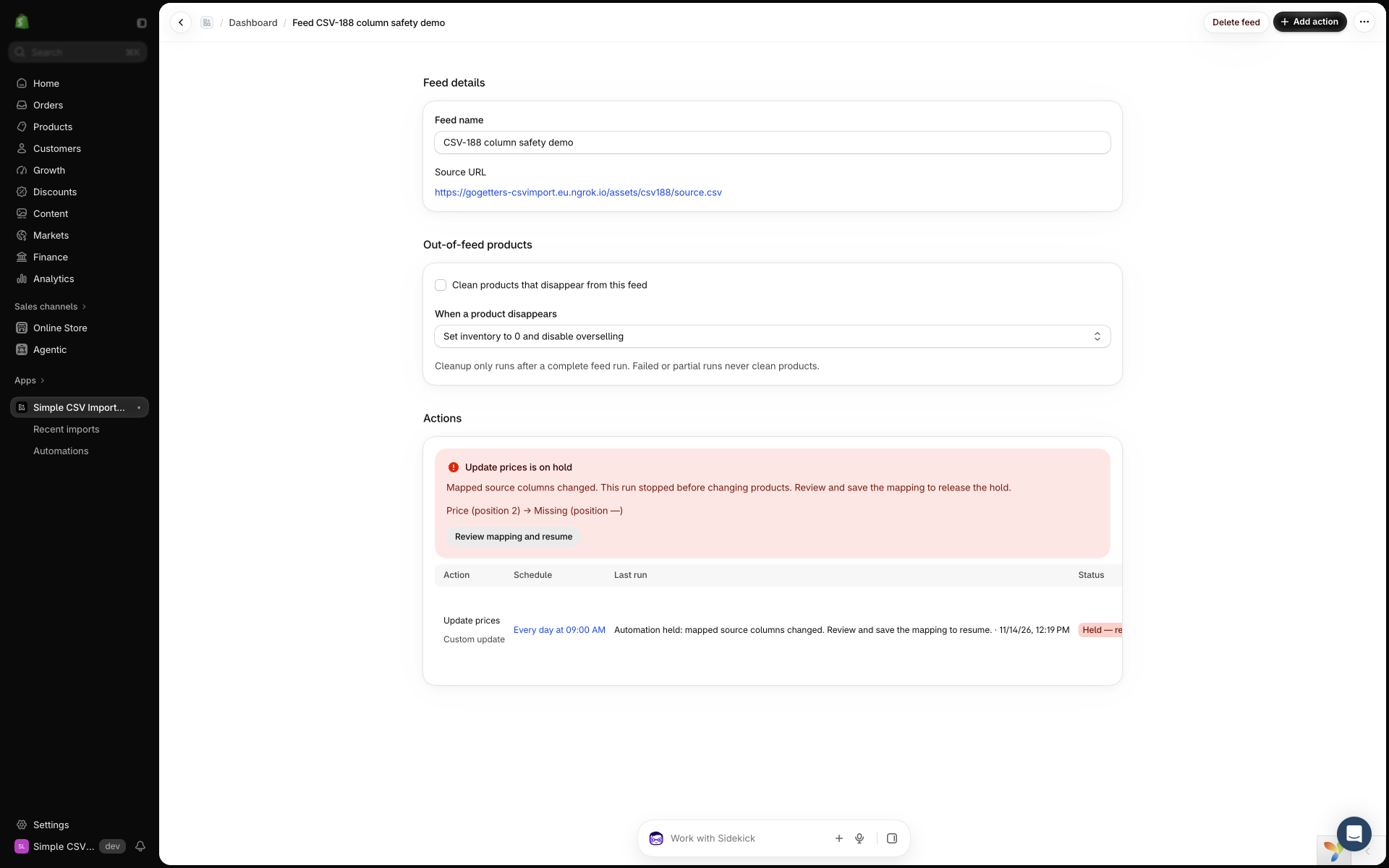
The action has a badge showing that it is held and needs mapping review. Run now is disabled while the hold remains. It cannot clear a hold.
We send one email when the action enters a hold, rather than another email at every scheduled attempt. Its subject is Your Simple CSV action needs mapping review. The message includes:
This run stopped before any products were changed. Future runs are held until you review the mapping.
The email lists the affected columns and links to your feed. It also says:
Map the affected fields to the correct columns and save. Saving a valid mapping releases the hold; your existing schedule stays in place.
A general feed-column alert is separate from this hold email. That alert explains that actions with unsafe mappings are held. Safe column-name mappings can continue when columns are added or reordered.
Review the mapping before saving
- On the feed page, select Review mapping and resume.
- Check the affected columns and their example values. Map each affected Shopify field to the correct replacement column. If an optional field is no longer needed, remove that field mapping. Keep a valid product-matching field, such as SKU, for updates.
- Select Save mapping.
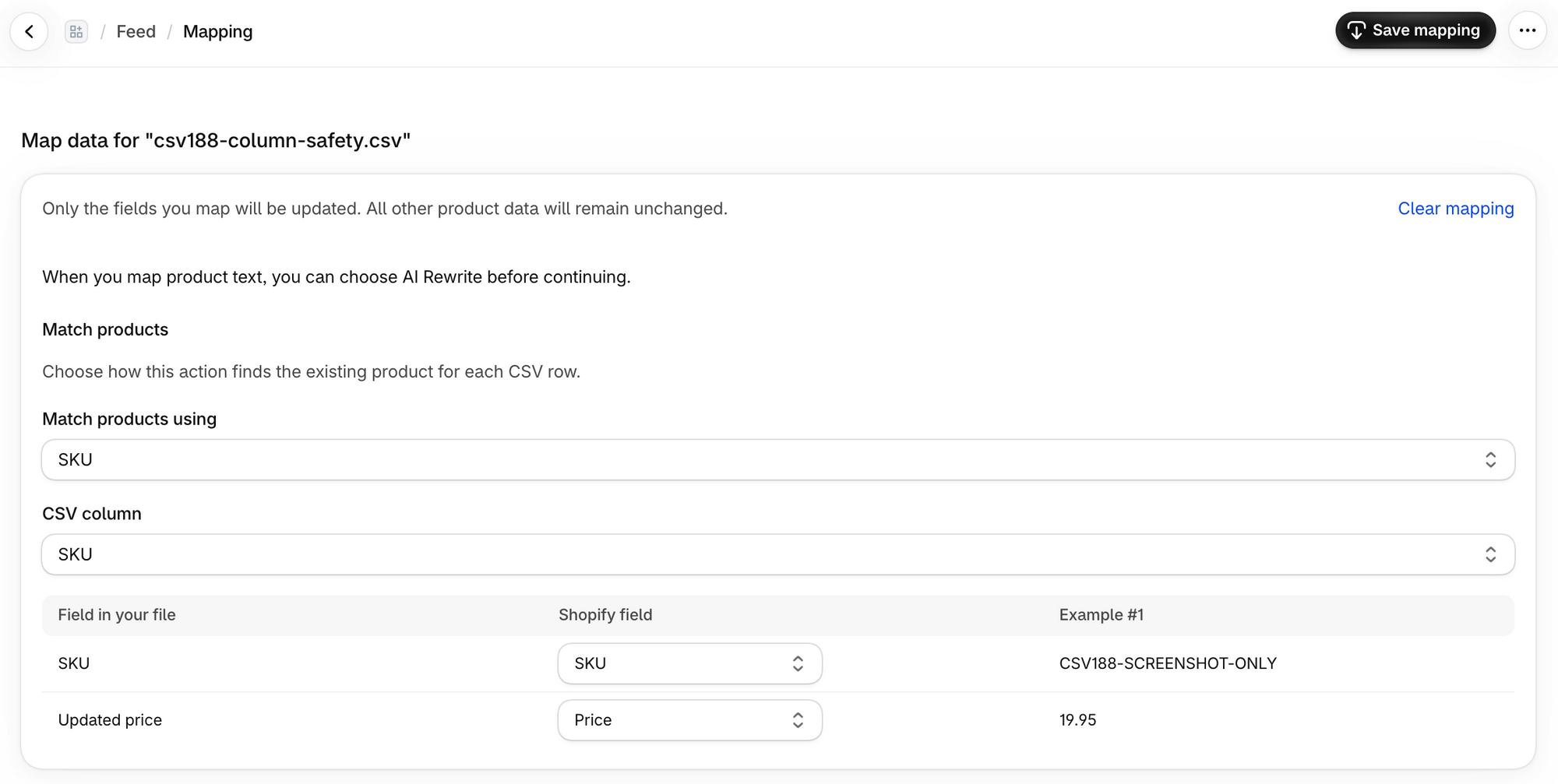
The app rejects a mapping that still points to a column missing from the file. It says:
Map every field to an available source column, or remove mappings for missing columns, before resuming.
If the source changes again during review, reopen the review and check the current file. The message is The feed changed again. Reopen mapping review.
What happens after Save mapping
A valid save clears the hold and shows Mapping updated successfully. Your existing schedule and active or paused setting stay the same. Saving changes the app configuration. It does not run the action or change Shopify products.
An active Pro or Scale action can run at its next scheduled time. A paused action stays paused. The button’s word “resume” means releasing the hold, not activating a paused action. You can use Run now after the hold clears to process the file manually. A successful run can change Shopify.
A hold does not undo changes from earlier runs. It prevents product changes by the held run.
If the mapping is unclear, contact us with the feed name and the warning’s column details.